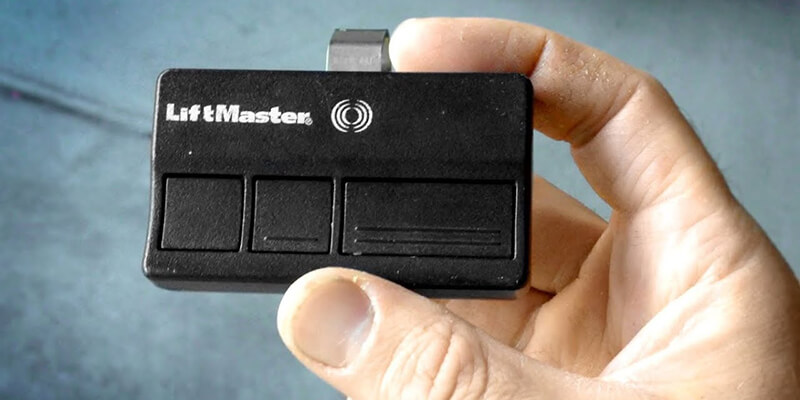
Programming your LiftMaster garage door opener is a straightforward task that enhances the convenience and security of your home. Whether you are adding a new remote control, setting up a wireless keypad for your children, or connecting your system to the MyQ smart home app, having a properly programmed opener ensures seamless access. CHS Garage Door Repair is here to guide you through each step, ensuring a smooth setup process.
Understanding LiftMaster Learn Button Colors
Before you begin programming any accessory, you must identify the Learn button color on your LiftMaster motor unit. LiftMaster has utilized different radio frequencies and encryption standards since 1993, which are color-coded on the Learn button itself. The button is typically located on the back panel of the motor unit, sometimes under the light cover. Locating this button and identifying its color is the first and most critical step in programming.
- Green Button (1993–1995): Operates on 390 MHz and utilizes Billion Code technology. Requires Billion Code remotes (such as model 811LM).
- Red or Orange Button (1997–2005): Operates on 390 MHz and utilizes Security+ rolling code technology. Compatible with remotes like the 971LM or 973LM.
- Purple Button (2005–2015): Operates on 315 MHz and utilizes Security+ rolling code technology. Compatible with model 371LM, 373LM, or 377LM keypads.
- Yellow Button (2011–Present): Operates on Security+ 2.0 tri-band frequency. Features a round yellow button with a yellow antenna wire. Compatible with newer models like 893LM, 893MAX, and 878MAX keypads.
How to Program a LiftMaster Remote Control (Step-by-Step)
There are two primary methods to program a remote control, depending on whether you are using the Learn button on the motor unit or the wall console (Smart Control Panel).
Method 1: Using the Learn Button on the Motor Unit
- Locate the Learn button on the motor unit. Press and immediately release it. Do not hold it down (holding it down for more than 6 seconds will erase all programmed remotes from memory). The LED indicator light next to the button will glow steadily for 30 seconds.
- Within those 30 seconds, grab your remote control and press the specific button you wish to use to operate your garage door.
- Hold the button down until you hear two clicks from the opener or see the overhead light bulbs blink. This indicates the programming was successful. Release the remote button.
- Test the remote to verify the door opens and closes properly.
Method 2: Using the Smart Control Panel (Wall Console)
If your home features a premium LiftMaster wall console with an LCD screen or a dedicated program button, you can program remotes without climbing a ladder.
- For LCD panels: Press Menu, scroll down to Program, and select Remote. For non-LCD panels with a dedicated button: Locate the “Program” or “Learn” button on the side of the wall console and press it twice.
- Press the button on your remote control that you want to program.
- The opener lights will flash or click, indicating the code has been accepted. Press the wall button to exit programming mode.
How to Program a LiftMaster Wireless Keypad (Model 878MAX / 377LM)
A wireless keypad allows keyless entry into your home using a secure 4-digit PIN. Follow these steps to program your keypad:
- Press and release the Learn button on the motor unit (the LED will light up, starting a 30-second timer).
- On the keypad, type in your desired 4-digit PIN, then press and hold the ENTER button.
- Keep holding the ENTER button until the opener light bulbs blink or you hear two clicks. Release the ENTER button.
- Wait for the keypad lights to stop blinking, then type in your 4-digit PIN and press ENTER to test manual operation.
How to Program LiftMaster MyQ Smart Openers (App Connection)
Newer LiftMaster openers with built-in Wi-Fi allow you to control and monitor your garage door using your smartphone via the MyQ app.
- Download the free MyQ app from the App Store or Google Play Store and create an account.
- Ensure your garage has a strong Wi-Fi signal (at least 2 bars on your smartphone).
- Put the opener into Wi-Fi setup mode by pressing the Learn button 3 times consecutively. The opener will beep and the LED light will flash.
- Open the MyQ app on your phone, select “Add Device,” choose “Garage Door Opener with Wi-Fi,” and follow the on-screen prompts to connect to your home Wi-Fi network.
- Once connected, you can set up real-time alerts, check if the door is open, and grant secure access to family members.
How to Erase the Opener Memory (Clearing All Codes)
If you have lost a remote control, bought a new home, or are experiencing security issues, you should clear all codes from the opener’s memory. This deactivates all programmed remotes and keypads.
- Press and hold the Learn button on the opener motor unit.
- Continue holding the button for approximately 6 to 8 seconds until the LED light next to the button goes out.
- All remotes and keypads are now erased. Follow the programming steps above to add back the remotes and keypads you still own.
Table: Troubleshooting LiftMaster Programming Failures
| Problem | Common Cause | Step-by-Step Solution |
|---|---|---|
| LED light blinks but remote doesn’t program | LED bulb interference or wrong frequency | Ensure you are not using cheap LED bulbs in the opener (use garage-door-safe bulbs). Verify remote compatibility. |
| Learn button LED won’t light up | Opener has no power or logic board failure | Check that the opener is plugged in. If the wall console works but Learn button LED stays dead, the logic board may need replacement. |
| Keypad won’t program | Battery low or timed out | Replace the 9V battery in the keypad. Make sure you type the PIN and hold ENTER within 30 seconds of hitting Learn. |
| Remote only works when standing next to motor | Damaged antenna or signal interference | Uncoil the thin antenna wire hanging from the motor unit. Check for metal obstruction or LED bulb interference. |
When to Seek Professional Help
While programming your LiftMaster garage door opener is generally a DIY task, complex issues like logic board failures, severe radio frequency interference, or damaged receiver antennas require professional diagnosis. If your opener refuses to enter programming mode or erases codes unexpectedly, the internal logic board may have suffered a power surge. CHS Garage Repair Of Seattle is ready to step in. In Redmond, we diagnose travel limits, force settings, and sensor wiring—start here: Redmond opener help.